
Find a receipt for a payment
Go to Budget, open Added funds and find the payment. Select View receipt to open its Stripe receipt. Stripe also emails each receipt to you when you pay.
Steps
- Go to Budget.
- Open Added funds. The most recent are first.
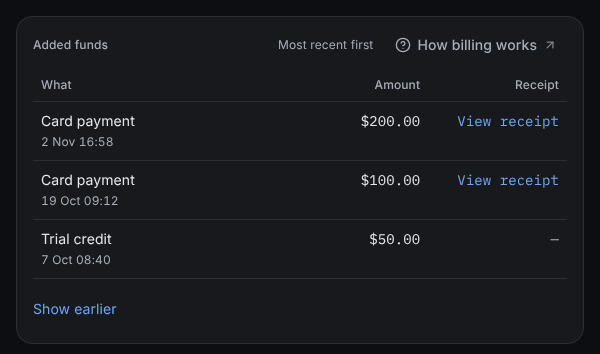
Added funds sits below the chart, most recent first. - Find the payment by its date and amount. To see older ones, select Show earlier.
- Select View receipt. The receipt opens in a new tab.
What you'll see
Each row says what it was: Card payment, Refund to your card, Payment disputed, Trial credit, Credit from Axiom or Adjustment. Money taken back out shows with a minus sign. Rows with no receipt, such as Trial credit, show a dash.
If something's different
- No rows yet: "Card payments you make show here, each with its receipt." You haven't added funds by card.
- We couldn’t load what you’ve added. Select Try again. Your balance in Available is still right.
Still stuck? In the app, open Help and choose Email support.
Related
Checked against the product on 18 November 2026
Still stuck?
Tell us what you were trying to do and we'll help.