
What a Role is
Roles (AI teammates, each with one job) do the work toward your goals. Your founding Role plans that work and proposes every other Role, and Your Roles shows what each one is doing, delivering and costing.
How it works
- Your founding Role is the first Role in your workspace. It shows as Your founding Role, and its detail says "Your founding Role builds the rest of your Roles." It turns each goal into steps, proposes the Roles to staff them, and sends each plan to you to approve. It never does the work itself, and it can't spend beyond what you fund.
- Every other Role is created by a Role above it, named under Created by in its detail. A Role can only ever have part of what the Role that created it can do.
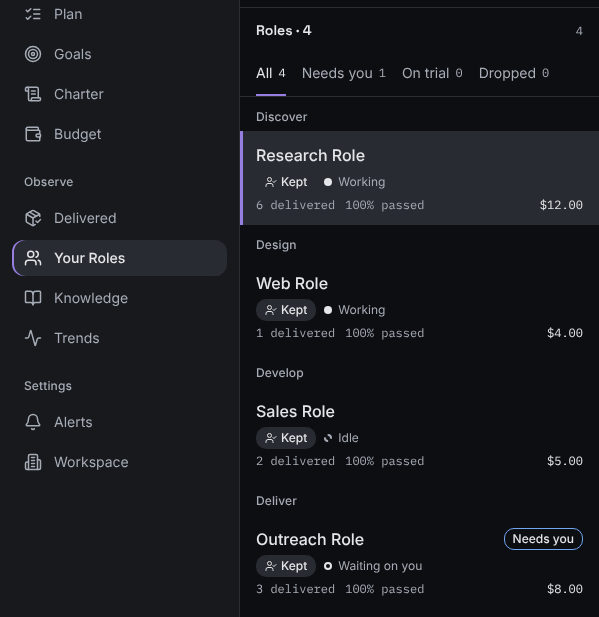
- Status says where a Role stands:
- On trial: a new Role, still proving itself. Its detail shows Trial ends with a date.
- Kept: a Role that has passed its trial and stays on.
- Dropped: a Role that has been retired. It does no more work, and the list shows it under Dropped.
- Activity says what a Role is doing right now, as a shape and a word:
- Working: it has work in hand.
- Waiting on you: it has asked you something. The list also marks it Needs you.
- Idle: it has nothing to do at the moment, for example "waiting for its next step".
- Stopped: all work in the workspace is stopped, for example "You stopped all work" or "Spending limit reached".
- Available: a Kept Role whose goal has been reached, ready for the next one.
- Figures show what a Role has produced:
- Delivered: work that passed checks, "passed checks, last 14 days".
- Passed checks: the share of its checked work that passed.
- This Role's cost: what the Role has cost so far.
- Cost per delivery: "total cost ÷ deliveries". Your founding Role doesn't show this figure, because it plans rather than delivers.
What you'll see
Go to Your Roles in the sidebar. The list is grouped in plan order: Founding Role first, then Discover, Design, Develop, Test and Deliver, then Between steps and Dropped. Each row shows the Role's name, its status, its activity, and what it delivered, passed and cost.
A figure with nothing to measure yet reads Not measured yet. A dash means there's nothing to divide yet, for example no deliveries to work out a cost per delivery.
If something's different
- No Roles yet means your Roles haven't started. They appear here as they're added to ready goals, within your spending limit.
- If you see Can’t load your Roles right now, reload the page in a minute. Your spending limit and the suspend control keep working either way.
Still stuck? In the app, open Help and choose Email support.
Related
Checked against the product on 11 November 2026
Still stuck?
Tell us what you were trying to do and we'll help.