
Find work your Roles delivered
Go to Delivered. Everything your Roles (AI teammates, each with one job) have delivered is listed, grouped by goal, and the first one opens beside the list. Only work that passed its check is listed.
Steps
- Go to Delivered and choose All, Passed or Not passed. Each tab shows how many it holds.
- To narrow the list, select Filters, then choose a Goal, a Role or a time under Delivered. Select Done to go back to the list.
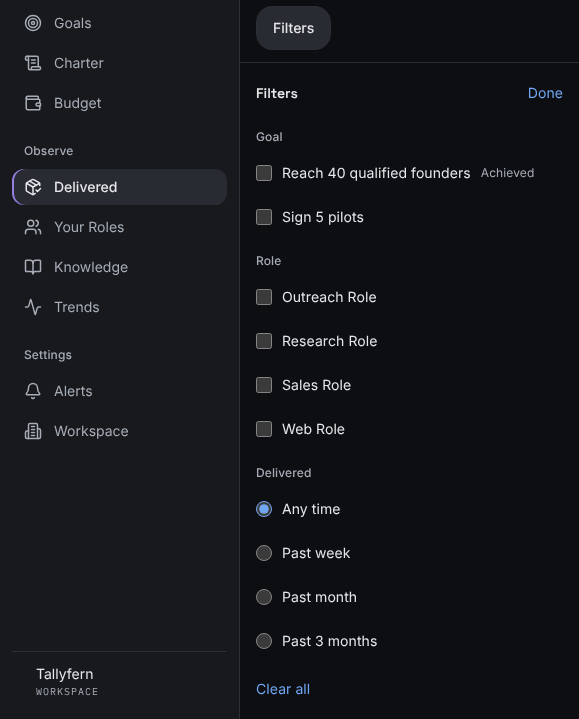
Filters opens in place of the list, and Done brings the list back. - Select a deliverable to open it.
What you'll see
The tabs at the top, then your deliverables grouped by goal. The open goal lists its deliverables, each with its date and its review: Passed review, Changes asked for, Review due or Not reviewed, then a line such as All 12 in this goal. Every other goal is one row with its count and its latest date; select it to open that goal's newest deliverable. Under the list: "Reviews sit inside the piece they checked, not in this list." With filters on, the button reads Filters · and how many, and each filter shows as a chip above the list, such as Delivered: Past week. Select ✕ on a chip to remove it, or Clear all. From a goal on Goals, the Delivered section links to each deliverable and to the goal's full list.
If something's different
- Nothing delivered yet: work appears here once a Role hands it in and it passes its check.
- Looking for something specific? See Search Delivered.
Still stuck? In the app, open Help and choose Email support.
Related
Checked against the product on 11 November 2026
Still stuck?
Tell us what you were trying to do and we'll help.