
You can't change part of a goal: why
What you can change on Goals depends on who set the goal. Goals marked Plan came from your plan, and change only through the plan: you send a version back on Plan. On goals marked You, you can change the target and drop the goal. A goal's name, unit and deadline can't be changed on Goals.
Steps
- Go to Goals and select the goal. Check the marker under its name: You, Plan or Role.
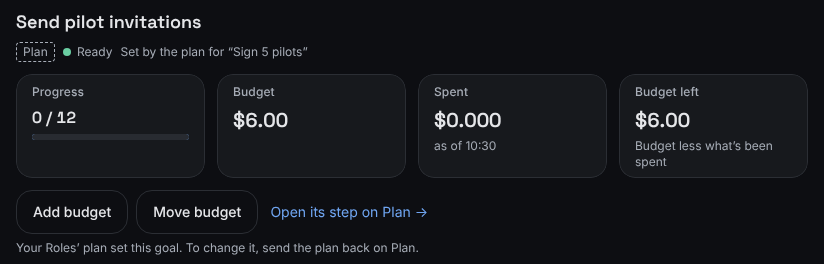
A goal your plan set points you back to the plan. - If it shows Plan, you can't change its target or drop it here. You can still add or move its budget. Select Open its step on Plan.
- On Plan, if the plan shows Send back, select it, say what should change in What should change? (required), and select Send back with this reason. Your founding Role revises the plan.
- If it shows You, select Edit target to change the target. See Change a goal's target.
What you'll see
On a goal your plan set, there's no Edit target or Drop goal. Instead you'll see: "Your Roles’ plan set this goal. To change it, send the plan back on Plan."
On a goal you set, Edit target and Drop goal show while the goal is active and isn't under another goal.
Some things can't be changed on any goal today:
- The name and unit: there's no way to rename a goal or change its unit after it's created.
- The deadline and how often progress is reviewed: each goal you add during setup gets both there, and they can't be changed afterward. Goals shows them under the goal's markers, for example "Deadline 31 Mar 2027 · Reviewed weekly". Steps your plan adds under a goal don't show them.
- Ended goals: a goal that's Achieved or Dropped takes no more changes.
If something's different
- No Send back on the plan? It shows only while a version is waiting for your review, or after one started without asking you. A plan you've already approved and that is running has nothing to send back. Its next version comes to you for review.
- On a goal marked Role, there's no Edit target or Drop goal either. You can still add or move its budget. See Add or move budget for a goal.
- Record measurement shows only on goals you measure yourself, and not on goals your plan set. See Record where a goal stands.
Still stuck? In the app, open Help and choose Email support.
Related
Checked against the product on 11 November 2026
Still stuck?
Tell us what you were trying to do and we'll help.